Memory Inspector
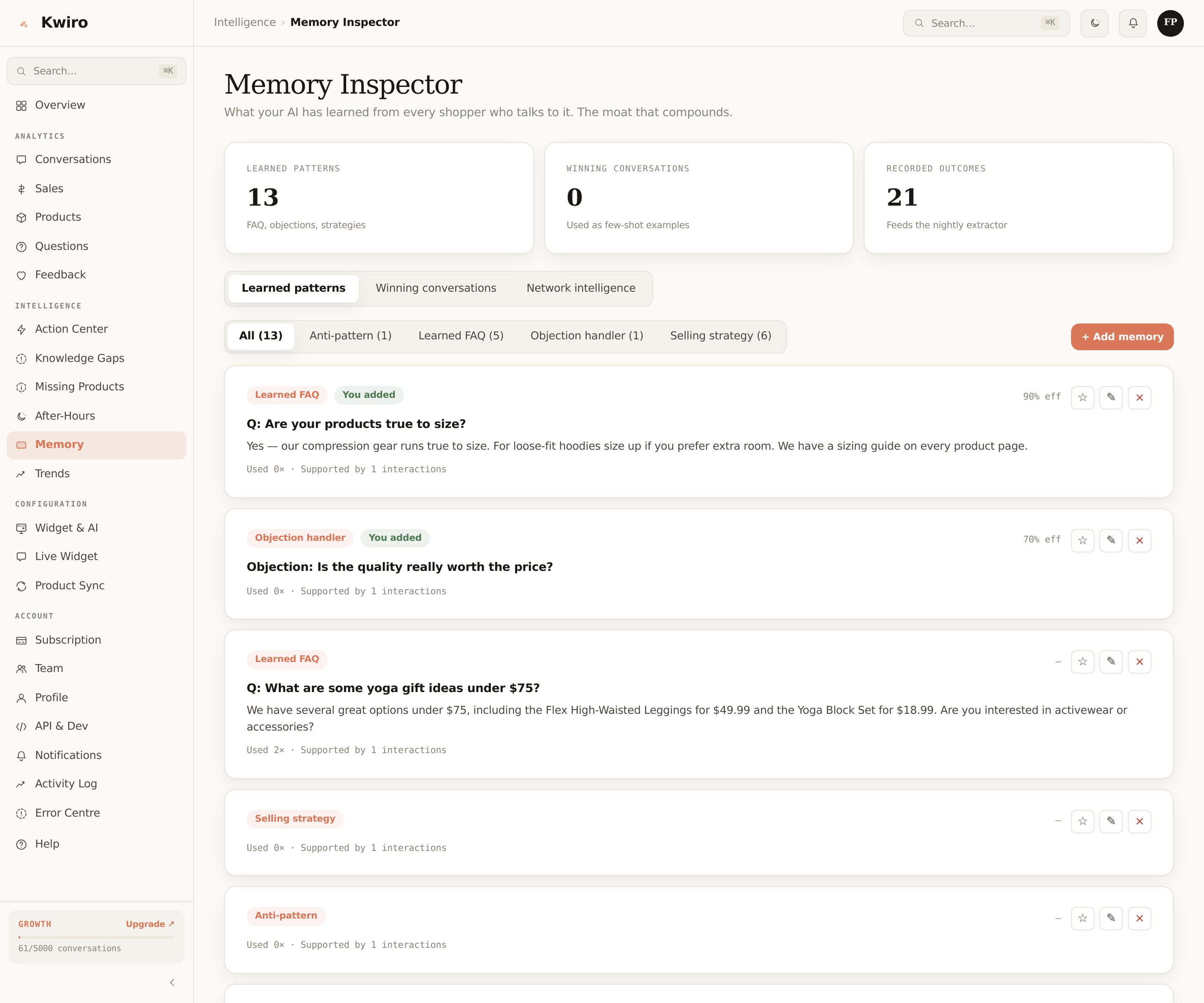
Growth+Pin, edit, or delete what your AI has learned. The unique tool that lets you control the patterns Kwiro uses to sell.
You Control What the AI Remembers
Most AI tools are black boxes — you have no idea what they've learned about your store. Memory Inspector is the opposite. Every pattern your AI has extracted from real conversations shows up in a list. You can read it, pin it, edit it, or delete it.
This is a Growth and Scale feature. It's also Kwiro's biggest moat: when you switch to a competitor, all of this resets to zero.
Where Memory Comes From
After every conversation that leads to a sale (or a strong thumbs-up), Kwiro extracts what worked into your store's memory bank. Five types:
| Type | What it captures |
|---|---|
| Learned FAQ | Questions shoppers ask + answers that performed well. |
| Selling strategy | Patterns that converted ("compare two products → suggest the bundle"). |
| Objection handler | Pre-tested responses to "is this real wool?", "is shipping really free?", etc. |
| Anti-pattern | Phrasings that killed sales. The AI avoids these. |
| Product insight | Specific knowledge about specific products from real shopper Q&A. |
What You Can Do
Pin
Pinned memories always make it into the AI's context, even if it has hundreds of higher-effectiveness rivals competing for the token budget. Use this for things that are absolutely critical: your hero closing line, your unique-selling-point on a top product, etc.
Edit
If a learned pattern is almost right but worded poorly, edit it. Your edit replaces the original. The AI uses your version going forward, marked as owner_edited so it always wins over auto-extracted versions.
Delete
Soft-deletes the memory (sets retired_at). The AI stops using it immediately, but the row stays in the database in case you change your mind. Anti-patterns (failed selling phrasings) are auto-retired after 5 attempts with low effectiveness.
Add
You can write custom memories yourself — most useful for selling strategies ("when shoppers ask about size 14, mention our extended sizing collection") or product insights that the AI hasn't picked up yet.
How Effectiveness Score Works
Each memory has a effectiveness_score (0.0–1.0). It's updated atomically every time the memory contributes to a conversation:
- Customer bought → +0.1
- Thumbs up → +0.05
- Thumbs down → -0.1
- Customer left without action → -0.02
Memories with score below 0.3 after 5+ uses get auto-retired. You don't have to do anything.
When to Audit Manually
Twice a year is enough for most stores. Quick checks:
- Sort by effectiveness, look at the top 20. These are your AI's "greatest hits". Pin the strongest ones.
- Filter by anti-pattern type. Skim the list. Anything embarrassing? Delete it.
- Look for FAQ duplicates (different wordings of the same question). Pin one, delete the rest.
Why This Beats Competitors
No other AI sales tool lets you see what's been learned, let alone edit it. Tidio's automation flows are pre-built triggers; Gorgias's macros are templates you write. Kwiro is the first to expose the AI's actual learning surface.
This compounds: month 1 your AI is generic. Month 12 your AI sells like your best in-store associate, with patterns nobody else can replicate.
Read-Only Members
Members on your team see the Memory Inspector in read-only mode. Only the Owner can edit, pin, delete, or add. This is intentional — memory shapes what every customer hears, so changes route through one person.
Related reading
Getting Started
What is Kwiro?
Learn what Kwiro does, who it's for, and how it turns your WooCommerce store into a 24/7 sales machine.
ReadDaily Use
Your Dashboard Overview
A guided tour of the Kwiro dashboard -- see your AI's performance, revenue impact, and customer conversations at a glance.
ReadCustomization
Customizing Your Widget
Match the Kwiro chat widget to your store's brand with custom colors, position, welcome message, and bot name.
Read