After-Hours Impact
Pro+How much revenue your AI generates outside your business hours, when no human staff would have answered.
Revenue You Couldn't Have Captured Without AI
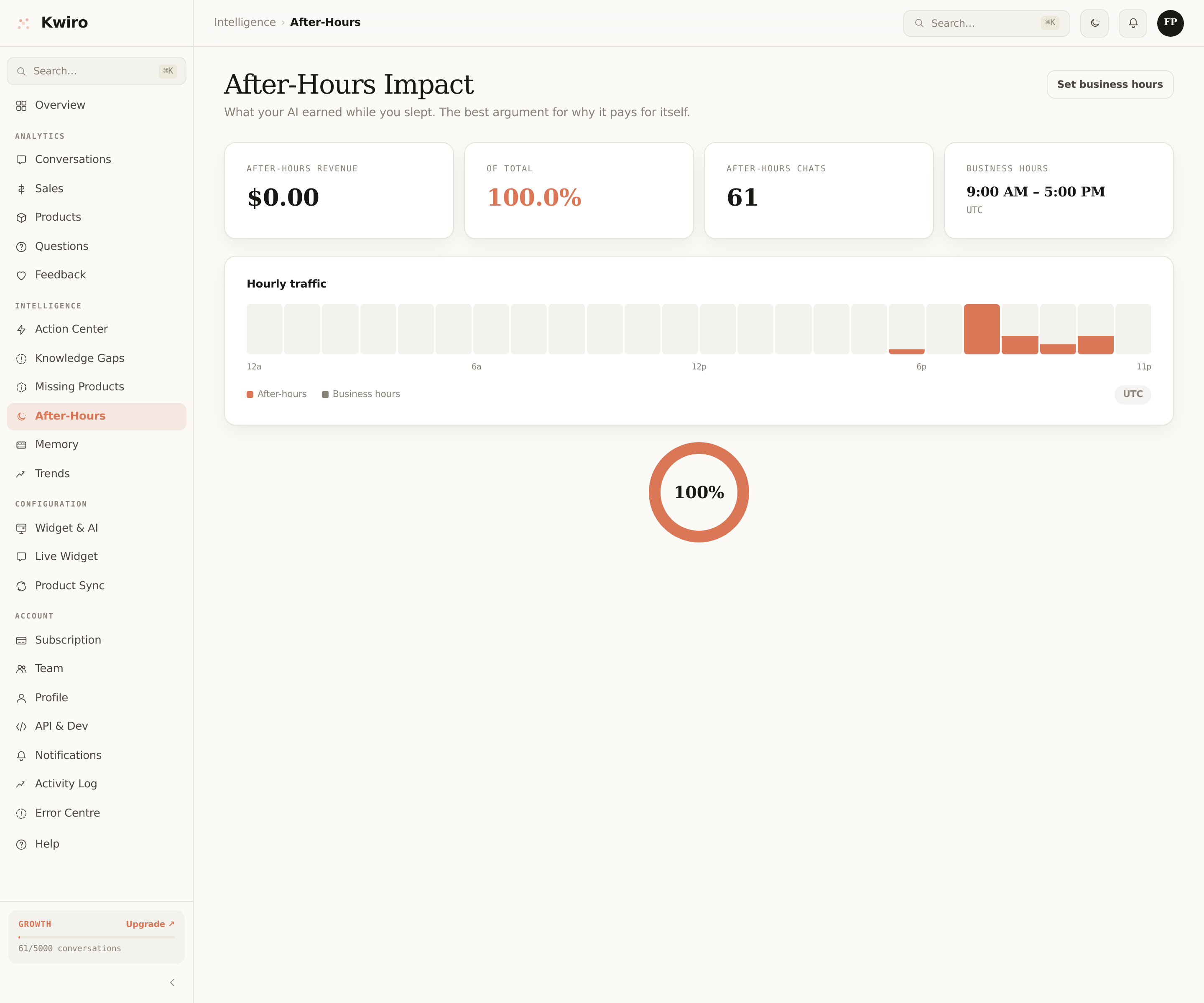
The After-Hours Impact report breaks down your AI-attributed revenue by time of day, against the business hours you set. The slice outside your business hours is revenue that wouldn't exist if the AI weren't running — because nobody else was there to answer.
What This Tells You
Most stores see between 35-60% of AI-attributed revenue happen outside business hours. The story:
- Evenings (8-11 PM) — peak browsing hours when most ecom shoppers buy.
- Weekends — when small-store owners are off but shoppers are at peak free time.
- Across timezones — you're in EST but shoppers in PST hit your site at "their" 9 PM, which is your midnight.
If your store has international traffic, this number can hit 70%+. The AI is functionally a second-shift sales staffer working free.
How to Read the Page
Three sections:
Headline number
42% of AI-attributed revenue last 30 days happened outside your business hours.
= $X,XXX you would have lost without 24/7 coverage.
Hourly breakdown chart
24 columns, one per hour of day, each split into "during-hours" and "after-hours" sections. You'll see two clear peaks — one inside your hours, one inside your "after" zone.
Top after-hours conversations
Click-through to actual transcripts of conversations that converted outside hours. Real evidence.
Setting Your Business Hours
Dashboard → Settings → Business Hours. Pick your timezone, then your start/end times for each day of the week. You can mark specific days as closed (so weekends count as fully after-hours if that's accurate).
The default is 9 AM – 6 PM Mon–Fri in your store's timezone. If you're a one-person shop, you might prefer 8 AM – 8 PM Mon–Sat to match how often you'd realistically be at your desk.
ROI Multiplier Effect
Most shop owners realize on first reading this page: their AI's value is bigger than the headline "AI ROI" number, because the after-hours slice is replacing zero, not displacing existing sales.
Free Tier
Available on all paid tiers. Free plan sees a locked-peek of the page with example data — useful for understanding the feature, but real numbers require Pro+.
Related reading
Getting Started
What is Kwiro?
Learn what Kwiro does, who it's for, and how it turns your WooCommerce store into a 24/7 sales machine.
ReadDaily Use
Your Dashboard Overview
A guided tour of the Kwiro dashboard -- see your AI's performance, revenue impact, and customer conversations at a glance.
ReadCustomization
Customizing Your Widget
Match the Kwiro chat widget to your store's brand with custom colors, position, welcome message, and bot name.
Read