Your First AI Conversation
Test your Kwiro installation by having your first AI-powered conversation on your store.
See Kwiro in Action on Your Store
Once installation is complete and your products are synced, it is time to see Kwiro working with real customers -- starting with you.
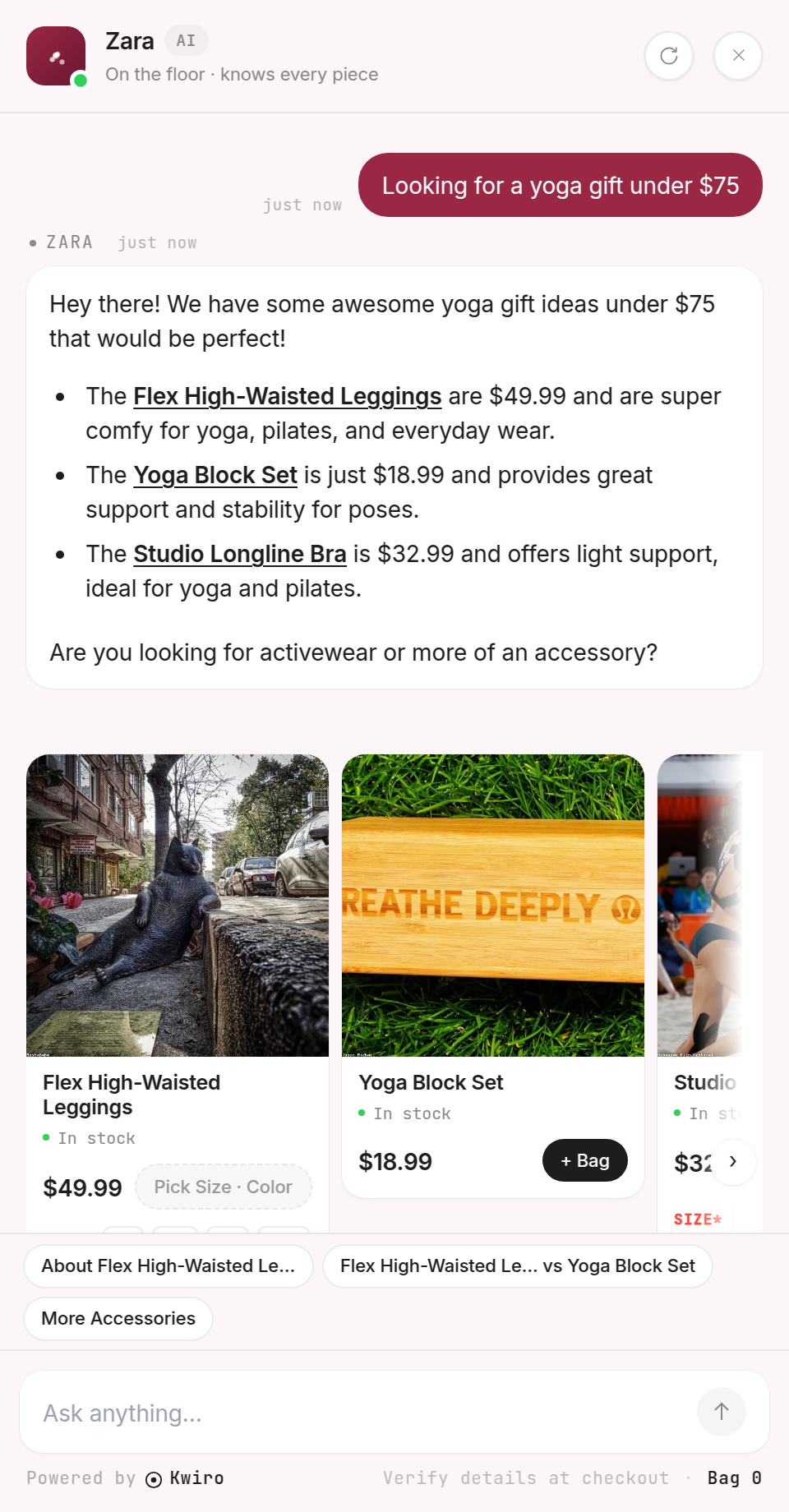
Step 1: Visit Your Store
Open a new browser tab and go to your store's home page or shop page. You do not need to be logged out, but using an incognito/private window gives you the most accurate customer experience.
Step 2: Find the Chat Widget
Look for a small chat bubble in the bottom-right corner of your page. It may say "Need help?" or show a chat icon. If you have customized the position to bottom-left, look there instead.
Click the bubble to open the chat window.
Step 3: Ask a Product Question
Try typing something a real customer would ask. Here are some good first questions to test:
- "What do you recommend under $50?"
- "I'm looking for a gift for my dad"
- "What's your most popular product?"
- "Do you have anything in blue?"
Type your question and press Enter or click the send button.
Step 4: Check the Response
Within a few seconds, Kwiro will respond with:
- A helpful text answer addressing your question
- Product cards showing matching items from your catalog, complete with images, prices, and a "View Product" link
- Suggested follow-up questions you can click to keep the conversation going
What to Look For
- Accuracy: Does Kwiro recommend products that actually match your question?
- Prices: Are the prices correct and up to date?
- Images: Do the product images load properly?
- Links: Does clicking "View Product" take you to the right product page?
Tips for Better Results
If the responses seem off, check these common causes:
- Missing product descriptions: Kwiro works best when your products have detailed descriptions. Short or empty descriptions give the AI less to work with.
- Sync not finished: Check the settings page to make sure the sync shows as complete.
- Very new products: If you just added products, give Kwiro a minute to pick them up.
Your AI assistant will get even better over time as it learns which products your customers ask about most. The first conversation is just the beginning.
Related reading
Daily Use
Browsing Conversations
Read every conversation your AI had with a shopper. See exactly what it recommended, where it helped, and where it could improve.
ReadCustomization
Customizing Your Widget
Match the Kwiro chat widget to your store's brand with custom colors, position, welcome message, and bot name.
ReadSmarter AI
Memory Inspector
Pin, edit, or delete what your AI has learned. The unique tool that lets you control the patterns Kwiro uses to sell.
Read